Pay owners from Kera, into their own bank account
Today you can pay owners from Kera. Paying owners is the last step of every month, and it's where small errors turn into awkward calls. You work out what each owner is owed, hold back enough for repairs, send the money, and then record it so the books match the bank.
Kera does the arithmetic from your books. For each owner, it shows the balance you hold for them, the reserve and what's ready to pay out. You record the payout in one step, and you can send it by Kera transfer to the bank account the owner added. Every payout starts with you, and Kera doesn't send one on its own.Note 1
See what each owner is owed
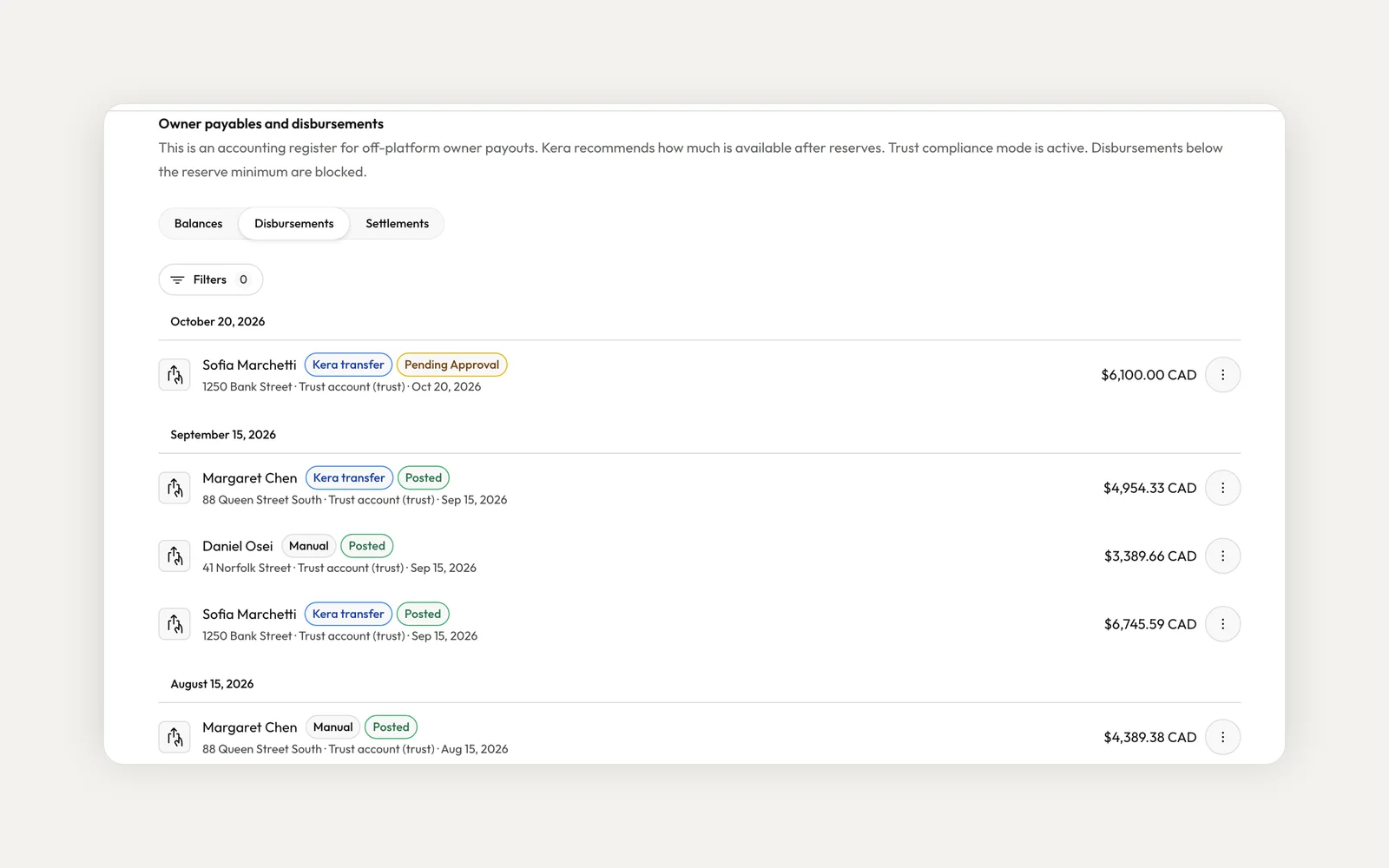
In Accounting, open Distributions. The Balances tab lists each owner with their payable balance and a badge that says In range or Needs attention, for example when a balance is negative or a reserve minimum isn't met.
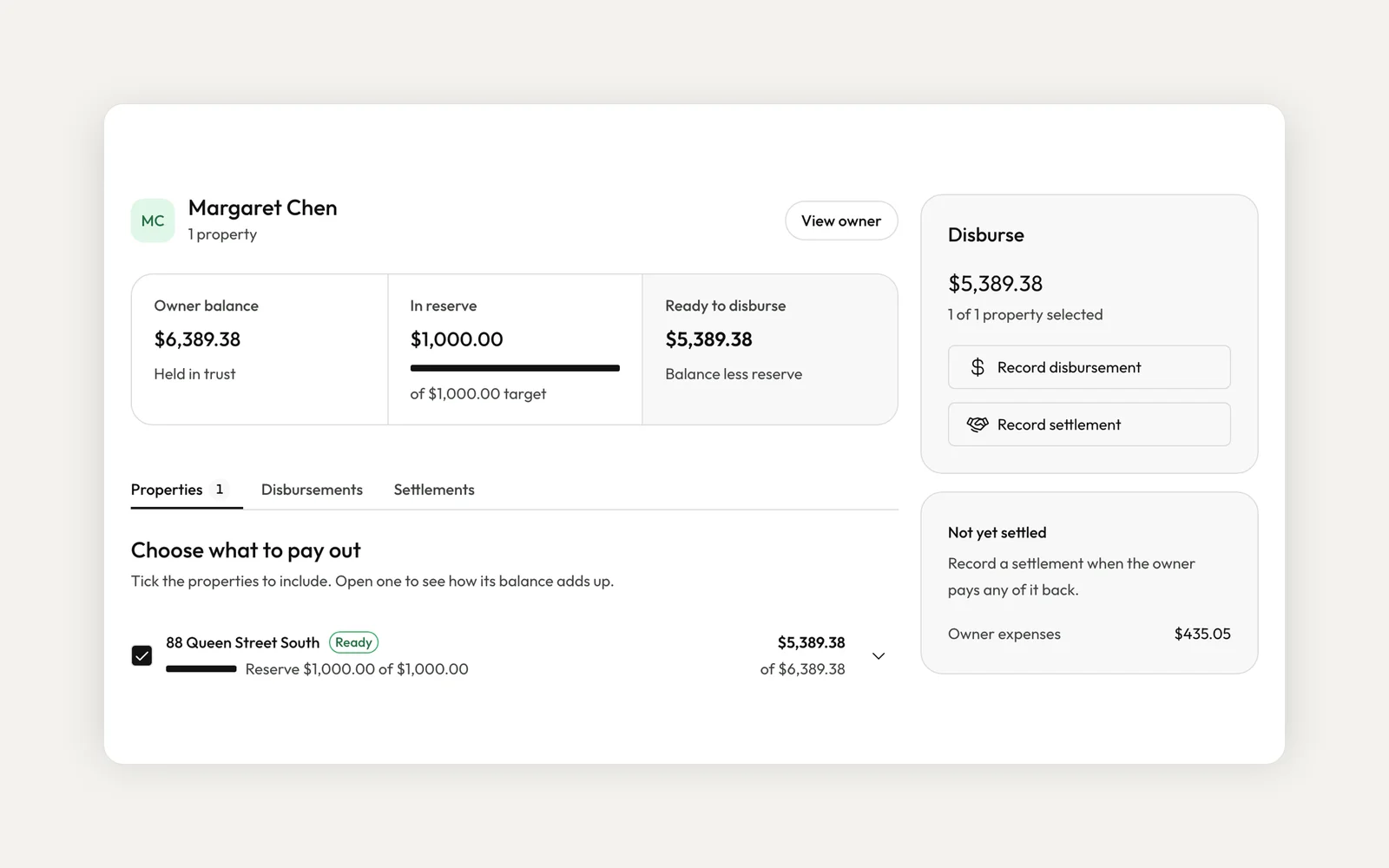
Open an owner to see their balance held in trust, what's in reserve against its target, and what's ready to disburse. Each property breaks its balance down into rent collected, management fees, owner expenses, any costs you covered for them and what's already been paid out. The Disbursements tab keeps the history, with each payout's owner, property, account, method and status.
Keep a reserve for each owner
Each owner contract can have a reserve minimum. That money stays in trust as a buffer for repairs, and the recommended amount leaves it in place.Note 2
In Settings, under Accounting, you choose what happens when a payout would take an owner below their reserve. By default Kera warns you and lets it through. Turn on Block disbursements below reserve minimum and Kera stops it instead.
Record a disbursement in one step
On the owner's page, choose Record disbursement. Kera fills in the recommended amount for each property, and you can change it. Pick the method, the trust or clearing account the money leaves from, and add a memo if you like.
If you have approval rights, you can post the payout straight away. If not, submit it and Kera notifies someone who can approve it. When you post it yourself, you also choose whether to send the owner's statement now or keep it as a draft.
Pay owners by Kera transfer
Choose Manual if you paid by cheque or e-transfer, and Kera records the ledger entry. Choose Kera transfer to send the money to the owner's Kera account, which pays it out to the bank account they added.Note 1
For that, the owner adds a bank account under Payment Setup, in the Financials section of their portal. You can also email or copy a bank setup link from the owner's details page. Until they finish, Kera transfer isn't offered for that owner.
Does Kera pay owners automatically?
No. You start every payout. Kera recommends an amount, and you send it by Kera transfer or record a payment you made another way.
What happens if I void a disbursement?
Voiding reverses it in the ledger and restores the owner's balance. For a Kera transfer, Kera first tries to reverse the transfer. If that fails, the disbursement isn't voided, so your books and the money stay in step.
When does the owner get the money?
That depends on our payment providers and the owner's bank. Any date Kera shows is an estimate.
To get started, open Accounting, go to Distributions and pick an owner. Owner distributions are for organization accounts, and accounting is part of Kera's accounting plan, so if you don't see Accounting in your sidebar, contact us. If you take rent online, check the Hold owners' money in Wallet setting under Wallet in Settings too. For more on avoiding payout disputes, read our guide below.
- Kera transfers are available to eligible accounts once the recipient's bank account is set up and verified. Our payment providers and the receiving bank process each transfer, so when the money arrives depends on bank processing times. A transfer can be delayed or declined for verification, available funds or provider rules, and any date Kera shows is an estimate. ↩
- Kera's trust accounting tools help you follow the trust rules that apply to you, such as TRESA 2002 and O. Reg. 567/05 in Ontario. They support, but don't replace, your brokerage's obligations under TRESA or your province's rules. Whether a rule applies to you depends on your registration. This is not legal advice. ↩
Run your whole business on Kera
Flat pricing, no per-door fees. Built for property managers.